Coming soon to Android

Salah Gate

Prayer & App Lock

Choose the apps that can wait. Salah Gate pauses them at prayer time and lets you back in when you mark the prayer.

Android 7.0+ · iPhone app in development

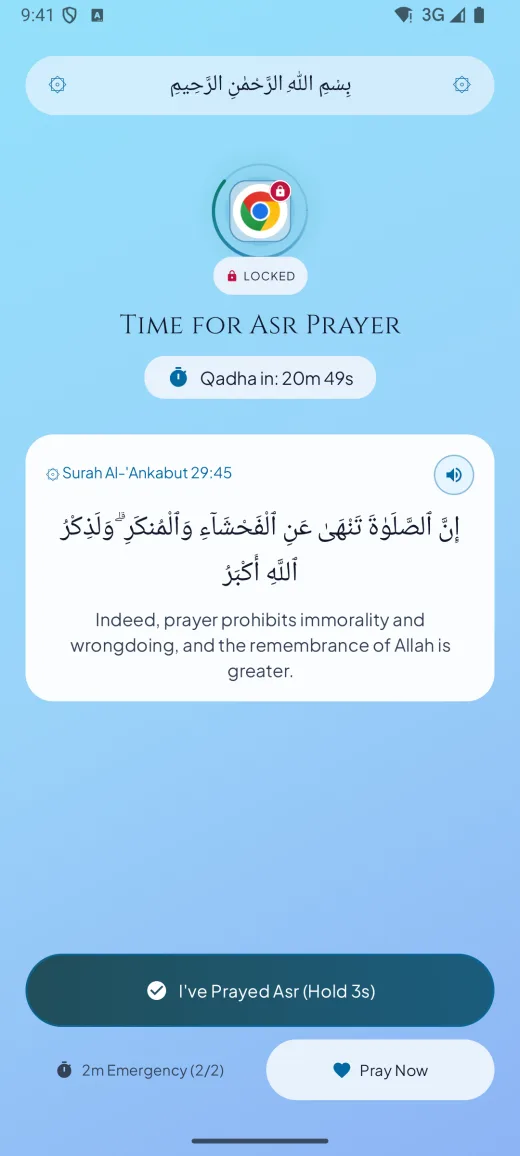
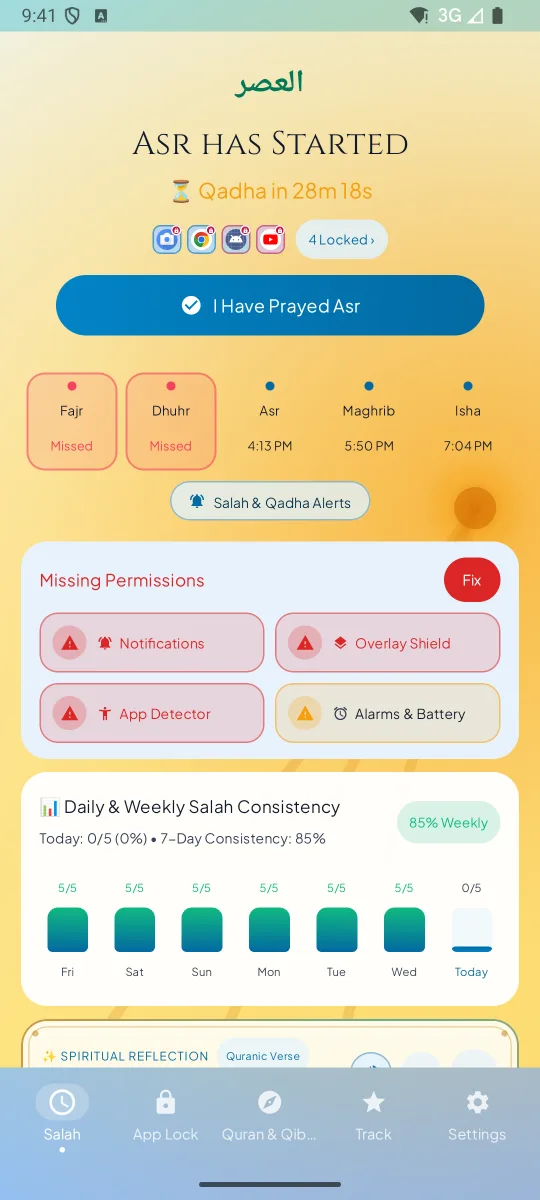
Salah Gate prayer screen showing Asr in progress, a guarded app paused until the prayer is marked, and a two-minute emergency pass

Salah Gate at a glance

Android
Coming to Google Play
Offline tools
Times, lock, Qibla and Qur’an text
App languages
5 translated · 16 partly translated
Ads and accounts
No ads · sign-in optional

Five prayers, one rhythm

Asr 4:45 PM

These are example times. Salah Gate calculates your prayer times on your phone.

Find the Qibla

Use your phone’s compass to find the direction of prayer.

Illustration only

How the lock works

Step 1

At prayer time

Salah Gate starts a window at each prayer time, plus the Jama'ah delay you set. A five-minute heads-up can arrive before the adhan.

Step 2

Only the apps you pick

Open one of your guarded apps and a prayer screen takes its place. Calls and apps you did not choose keep working.

Step 3

Then your apps return

Hold the ring to mark the prayer and your apps open again. A two-minute emergency pass is available twice a day, and the window also ends on its own.

Try the prayer lock

Open the example app, then mark the prayer to see the lock lift.

Example phone Social app

Asr has started.

A reminder or a prayer-time lock?

WhenPrayer reminderSalah Gate
When prayer time startsA notification arrivesThe apps you chose are locked and a prayer screen takes their place
If you dismiss itThe feed opens as usualThe prayer screen stays until the Salah window ends or you pray
When you confirm the prayerNothing changesA hold on the ring marks it prayed, the apps reopen and the streak grows
If you are excusedYou have to remember to ignore itExcused / Travel Pause keeps the apps open and the streak safe

A closer look at the tools

“So remember Me; I will remember you.”

Al-Baqarah 2:152
5m10m15m20m

Verse Gate

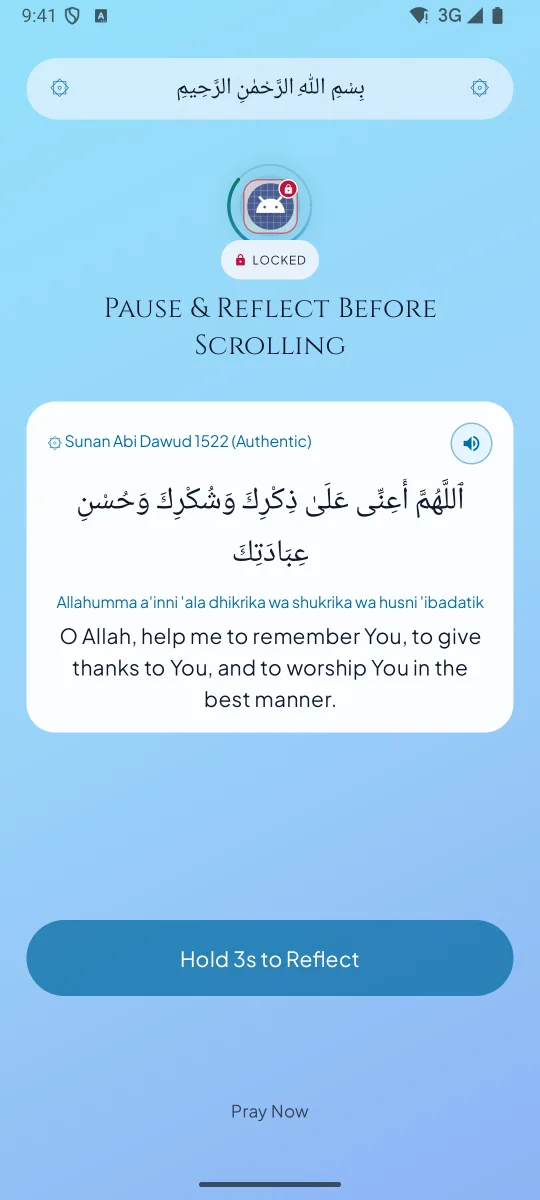
Pause with an ayah before opening a guarded app between prayers. Hold to reflect and choose how long to unlock it.

2:00Up to twice a day

Emergency pass

Use a pass to open a guarded app for two minutes. The lock returns automatically if the prayer window is still active.

12-day streak Example week

Prayer progress

See which prayers you marked on time, late, made up, missed, or excused.
Explore every feature

The Gate
Prayer Window App Lock
Locks your chosen apps for the length of each Salah window. A single master switch turns the whole shield on or off (Salah Shield Armed / Paused).
Instant interception
The prayer screen appears the moment a guarded app opens, instead of the feed.
Mosque Jama'ah delay
Shift the lock to match your mosque's congregation time.
5-minute pre-lock warning
So the lock never surprises you.
Auto Do Not Disturb
Switches your phone to Do Not Disturb for 15 minutes during congregation prayer, then switches it back, if you allow notification-policy access.
Strict Mode
Optional Settings protection with a live photo check and a five-minute timer. The photo is checked on-device when offline and can use Firebase AI Logic when online.
Hold-to-unlock
A short hold on a ring that fills as you hold it and buzzes when it completes, so unlocking is a deliberate choice, not a reflex.
Emergency pass
A 2-minute emergency unlock, up to 2 times a day. The app locks again automatically when the 2 minutes are up, even if you stay inside the app.
Excused / Travel Pause
Pauses locking and protects your streak during illness, menstruation or travel, without guilt.
Verse Gate
A pause before the feed
Before you open a distracting app, pause with a Qur’an ayah, a Prophetic Hadith or a 3× tasbih tap.
Hold to reflect
Hold for a few seconds to reflect (the duration is adjustable), then choose a mindful unlock of 5, 10, 15 or 20 minutes.
Ibadah Focus
Pause guarded apps for Qur’an reading, Nafl, Tahajjud or dhikr.
Offline prayer times and adhan
Fully offline prayer times
Choose a city from the built-in database or optionally use approximate location to find it. Prayer times are calculated on your phone.
Calculation methods
Karachi, ISNA, MWL, Umm al-Qura and Egyptian.
Asr method
Hanafi (later Asr) or Shafi'i / Maliki / Hanbali.
The whole day
Fajr, Sunrise, Dhuhr, Asr, Maghrib and Isha, plus Duha and the last third of the night for Tahajjud.
Isha past midnight
Correctly handles Isha running past midnight until Fajr.
Hijri date
With a moon-sighting adjustment of up to two days, so the date matches your local calendar.
Adhan options
Choose a full adhan, soft tone, lock-screen alert, or silence for each prayer.
Studio Adhan voices
Makkah (Hijaz), Madinah Fajr and Al-Aqsa. You can also use your own audio file from your phone.
Reliable alarms
Exact alarms that survive phone restarts and time-zone changes.
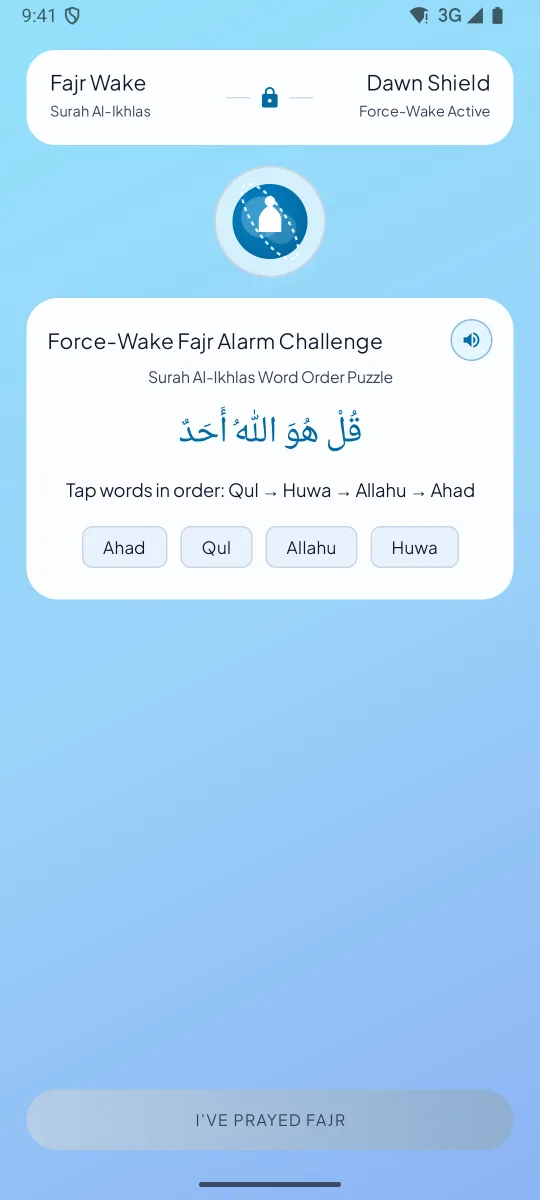
Fajr Force-Wake alarm
Force-Wake challenge
Use a full-screen Fajr alarm with a Surah Al-Ikhlas word-order puzzle.
Qur’an recitation, Qibla and adhkar
Qur’an text
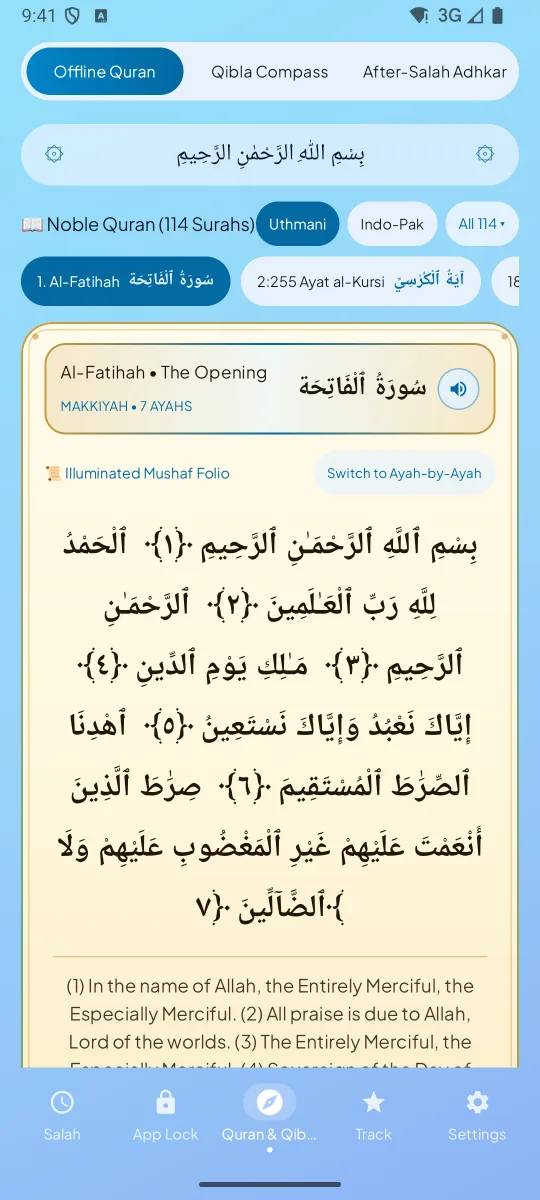
Read selected surahs in Uthmani or Indo-Pak script with translations.
Recitations by renowned Qaris
Mishary Alafasy, Mahmoud Khalil Al-Husary and Abdul Basit. Includes Ayat al-Kursi, Al-Fatiha, Al-Mulk, Al-Kahf (opening verses), Yasin, Ar-Rahman, Ash-Sharh, Al-A'la, and Al-Ikhlas / Al-Falaq / An-Nas.
Hear the meaning
After the Qari finishes, the app reads the translation aloud in your language.
Downloads, then offline
Recitations download once, then play offline.
Qibla compass
Uses your phone's motion sensors, with a vibration when you're aligned with the Kaaba.
After-Salah adhkar
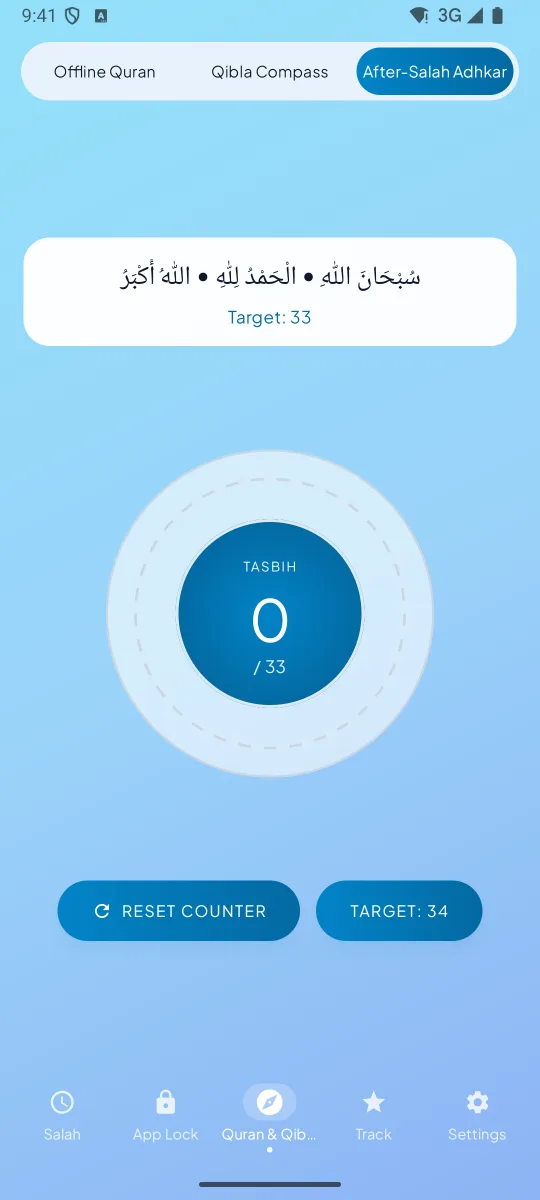
With a digital tasbih counter and a target count.
Streaks, charts and Qada Bank
Daily prayer streak
Complete all 5 prayers to build it.
Log each prayer
On time, late, made up (Qada), missed or excused. Each status has its own colour.
Charts that tell the truth
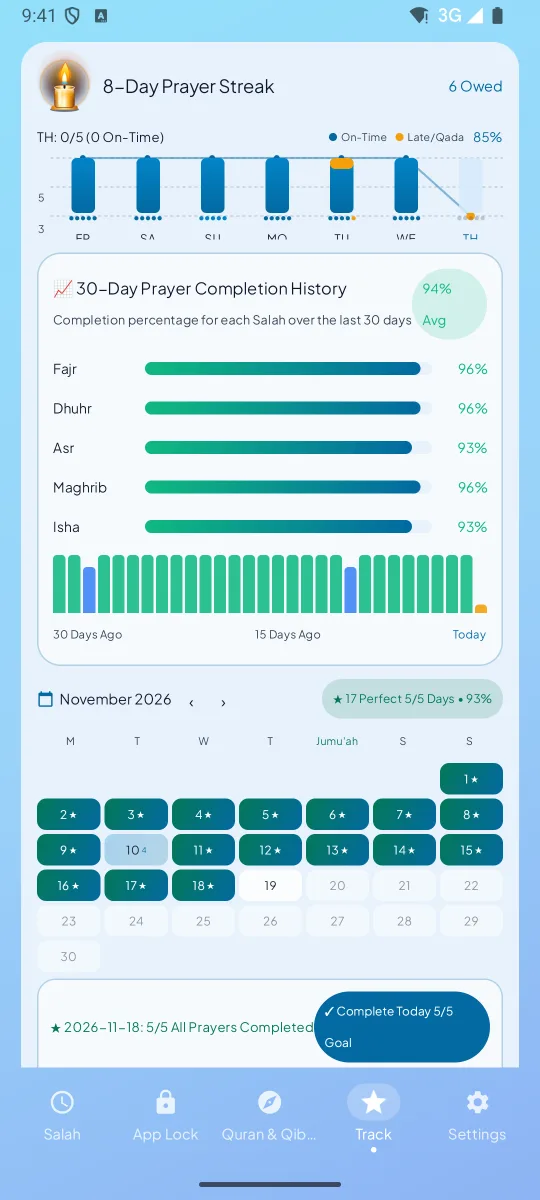
A 7-day consistency chart, 30-day history for each prayer and a monthly perfect-day calendar.
Qada Bank
Track missed prayers you owe and pay them off one by one.
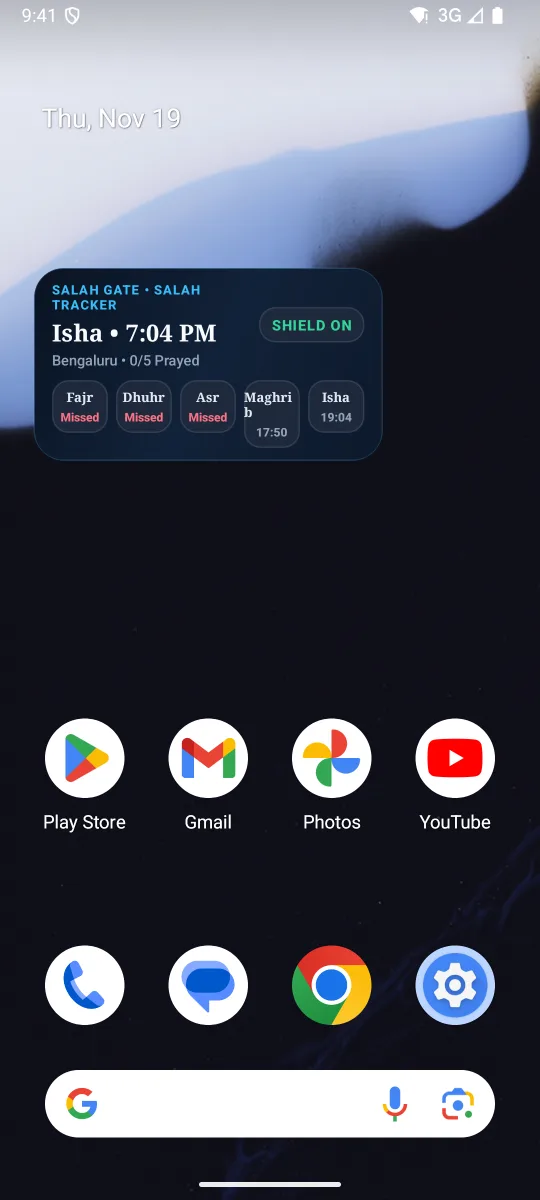
Home-screen widget
Today's Salah at a glance.
Languages and themes
English, Hindi, Urdu, Tamil and Arabic
The main flow supports all five, including right-to-left layouts for Urdu and Arabic. Sixteen more languages have partial translations.
Daylight and Midnight themes
A bright sky look by day and a calm low-light look for Isha and Tahajjud.
Comfortable to use
Large touch targets. Times show without leading zeros (5:15 AM) in 12-hour or 24-hour format.

Inside the app

Salah Gate home screen listing Fajr, Dhuhr, Asr, Maghrib and Isha for today, with the next prayer highlighted and a 12-day streak
Today’s SalahToday’s prayers, the next Salah and your streak.
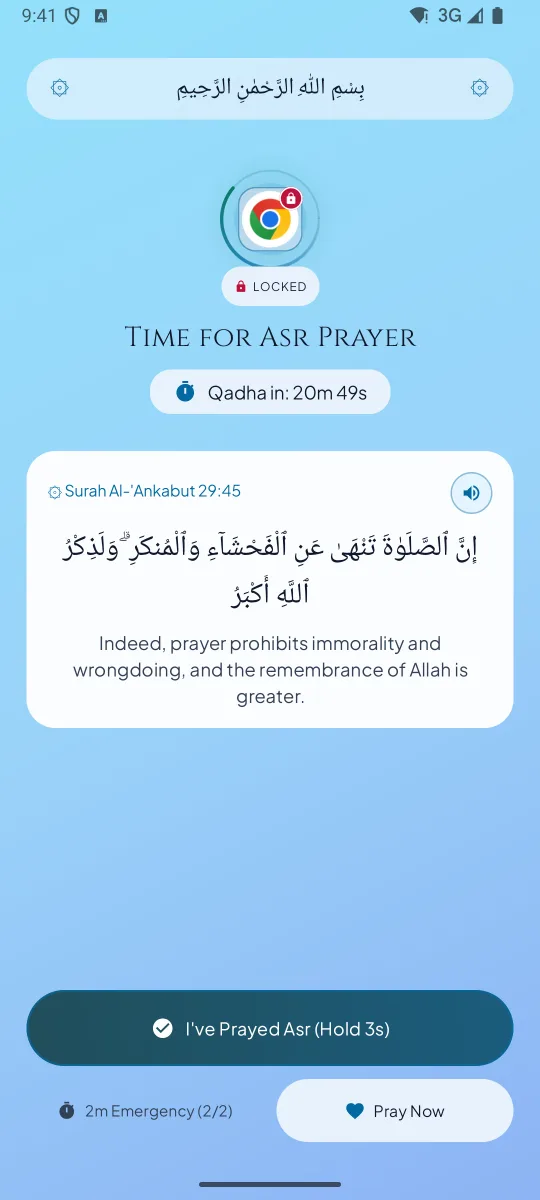
Salah Gate lock screen saying the app is paused until the current prayer is complete, with a Pray Now button
The gate closesOpening a guarded app during a Salah window.
Verse Gate showing a Qur’an ayah before a distracting app opens, with a hold-to-reflect ring and 5, 10, 15 and 20 minute options
Verse GateA pause with an ayah before a distracting app.
Qur’an reader in Uthmani script next to a Qibla compass pointing towards the Kaaba
Qur’an & QiblaUthmani or Indo-Pak script, and the Qibla.
After-Salah adhkar screen with a digital tasbih counter and a target count
Adhkar & tasbihAfter-Salah adhkar with a counter.
Streak screen showing prayers marked on time and late, with missed prayers listed in the Qada Bank
Streaks & QadaOn time, late, or made up later.
Seven-day consistency chart and monthly prayer calendar with each prayer status in its own colour
ChartsThe week, honestly.
Fajr Force-Wake alarm showing the Surah Al-Ikhlas word-order puzzle that stops the alarm
Fajr Force-WakeThe alarm that asks for a puzzle first.
Salah Gate home-screen widget showing today’s five prayers and the next prayer time
Home-screen widgetToday’s Salah, without opening the app.

Availability and plans

Android

Android 7.0 and newer

Coming soon to Google Play. Join the waitlist and we will email you on launch day.

Join the waitlist

iPhone

iOS 17 and newer

The iPhone app is in development. There is no App Store listing yet.

Salah Gate Pro

One subscription, the whole app

Salah Gate for Android requires a subscription to get started. Google Play will show monthly and yearly pricing and any available trial before you subscribe.

  • All five prayers, adhan, Qibla, Qur'an and progress tools
  • Unlimited guarded apps
  • The 1-Ayah reflection gate
  • Qada Bank for missed prayers
  • The Fajr Force-Wake challenge

If Pro ends, your prayer logs stay on your phone and are not deleted.

Get notified at launch

Joining the waitlist is free. The Android app requires a subscription to get started. You can review the price and any trial in Google Play when it launches.

We’ll use your email to let you know when Salah Gate launches. Waitlist privacy · Contact support

Who Salah Gate is for

Prayer terms explained

Salah
The five daily prayers. Also written salat or salaah, and called namaz or namaaz in Urdu, Hindi and several other languages.
Adhan
The call to prayer. Also written azan or athan.
Jama'ah
Congregation — praying together at the mosque or in a group, usually a few minutes after the adhan.
Qada
A prayer that was missed at its time and is made up later. Also written qaza.
Tahajjud
The optional night prayer offered in the last third of the night before Fajr.
Duha
The optional mid-morning prayer, offered after sunrise and before Dhuhr.
Qibla
The direction of the Kaaba in Makkah, which Muslims face during prayer.
Hanafi and Shafi'i Asr
Two ways of deciding when Asr begins: when an object's shadow is twice its length plus the noon shadow (Hanafi), or once its length plus the noon shadow (Shafi'i, Maliki and Hanbali).

Android permissions

Why Salah Gate asks for access on your phone.

Accessibility
To know which app has opened so the prayer screen can appear. Used only on your device; screen content is never read.
Display over other apps
To show the prayer and verse screens.
Exact alarms
So the adhan and the prayer alert fire at the exact minute, even when the phone is in Doze.
Notifications
Prayer alerts are notifications, so Android 13 and newer asks you to allow them. You can turn each prayer on or off in the app.
Do Not Disturb access
For optional Auto-DND: 15 minutes during congregation prayer, then it switches back.
Approximate location (optional)
To pick your city for prayer times; you can also choose a city manually.
Ignore battery optimisation
So alarms and the lock aren't killed by the phone's battery saver.

Internet access supports audio downloads, optional Strict Mode cloud checks and profile sync, and Google Play billing. Read the privacy policy.

Salah Gate languages

Translated

Partly translated

  • Bahasa Indonesia
  • বাংলা
  • Türkçe
  • فارسی
  • Bahasa Melayu
  • Français
  • Hausa
  • Kiswahili
  • Oʻzbekcha
  • Қазақша
  • پښتو
  • Soomaali
  • Shqip
  • Bosanski
  • Azərbaycan
  • Kurdî

Partly translated screens use English where a translation is missing.

Frequently asked questions

What is Salah Gate?

Salah Gate is NiyatWay’s Android prayer-time app lock. It pauses the apps you choose, then opens them again when you mark the prayer. It includes offline prayer times, adhan, Qibla, Qur’an reading and prayer tracking.

Is there an app that locks my phone during namaz?

Yes. Salah Gate locks only the apps you pick, for the length of each Salah window, and shows a prayer screen with a Pray Now button instead. Calls, messages and every other app keep working, so you are never cut off from something important.

How do I stop using my phone during salah?

Make the phone physically unavailable before the adhan, silence notifications, and use wudu as the moment you put it down. Salah Gate adds a practical barrier: the apps you chose simply will not open until you confirm the prayer with a short hold on the ring.

Why does Salah Gate need Accessibility permission?

It is the Android permission that tells an app which app is in front, so the prayer screen can appear. It runs only on your device, and screen content is never read.

Can I still take calls or use important apps during prayer?

Yes. Only the apps you choose are locked, so anything you have not selected, including phone calls, keeps working. There is also a 2-minute emergency pass, up to twice a day, and the lock returns on its own afterwards.

What happens if I pray late?

You can log the prayer as late, and it still counts towards your day. If you miss it entirely, you can mark it missed, log it as excused, or record it in the Qada Bank as a prayer to make up later.

Does Salah Gate work without internet?

Prayer times, the app lock, the Qibla compass and the included Qur’an text can work offline. Audio downloads, optional cloud checks and profile sync, and Google Play billing use internet access.

I'm ill, travelling or excused. Will I lose my streak?

No. Turn on Excused / Travel Pause. The app stops locking during that time and your streak stays safe.

How many apps can I guard?

The Android app requires a subscription to get started. The subscription covers unlimited guarded apps, Verse Gate, Qada Bank and the Fajr Force-Wake challenge.

Is Pro a subscription?

Yes. Google Play will show the monthly and yearly plans before you subscribe. Manage or cancel your subscription from Google Play.

Is there a free trial?

Google Play will show any available trial, its duration and the price before you subscribe. The waitlist is free to join.

Which prayer time calculation methods does Salah Gate support?

Karachi, ISNA, MWL, Umm al-Qura and Egyptian, with a choice of Hanafi or Shafi'i, Maliki and Hanbali Asr. Times are calculated offline on your phone from a built-in city database.

Does Salah Gate support the Hanafi Asr time?

Yes. You can choose Hanafi Asr, where Asr begins when an object's shadow is twice its length plus the noon shadow, or the Shafi'i, Maliki and Hanbali method, where it begins at once the object's length plus the noon shadow.

Can I set my mosque's jamaat time?

Yes. A Mosque Jama'ah delay shifts the lock to match your mosque's congregation time, and there is a 5-minute warning before the lock begins. The same setting works for an office or school jamaat time.

Does Salah Gate read my messages or my screen?

The Android accessibility service detects which app opens so it can show the prayer gate. It cannot retrieve window content such as messages, passwords or screen text.

Is Salah Gate on iPhone?

The iPhone app is in development for iOS 17 and newer. It does not have an App Store listing yet. Android 7.0 and newer is the planned first release.

When will Salah Gate be on Google Play?

It is coming soon. Join the waitlist and you will get one email on the day it launches — there is no date to share yet.

Is Salah Gate free?

Joining the waitlist is free. Salah Gate for Android requires a Google Play subscription to get started.

What Android version do I need?

Android 7.0 (Nougat) or newer is required. Prayer times are calculated on the device, and signing in is optional.

How does an app lock for salah actually work?

You choose the apps that pull you in. When a prayer time begins, Salah Gate watches for one of those apps coming to the front and shows its own screen instead, so the app waits until you mark the prayer. It uses Android's Accessibility service for that, and an emergency pass if you need one.

What if I'm at work during Dhuhr?

Only your selected apps are guarded. Calls and unselected work tools keep working. Mark the prayer or wait until the prayer window ends to reopen guarded apps.

What if I'm travelling or in a different time zone?

Salah Gate calculates times from the location you set, so when you travel you update the city and the times follow. If the device time zone changes, the calculation uses the new local date and time. Check the method against your destination's local mosque, since methods vary by region.

Can an app help me pray on time?

It can help you put distracting apps aside when it is time to pray. You choose which apps to guard and when to mark each prayer.

Can I use it to set a good example at home?

You can put your own phone aside at family prayer time. The app manages your selected apps on your device.

Does Salah Gate need an account?

Core features work without an account. Optional Google sign-in supports cloud profile sync, as explained in the privacy policy.

Will it drain my battery?

Salah Gate uses Android alarms and accessibility for prayer alerts and the app lock. Battery impact varies by phone and settings.

Is this a namaz app?

Yes. Namaz is the word many people use for salah, and Salah Gate is built around the five daily prayers: times, adhan, Qibla, a lock over distracting apps and a record of what you have prayed.

Does it show azan times?

Yes. Prayer times are calculated on the device from your location and the method you choose, and the adhan can play at each prayer. Calculated times can differ by a minute or two from your local mosque, so follow the mosque when they differ.

Does it work on tablets?

Salah Gate runs on Android 7.0 and newer, including tablets, but it is designed for phones and we have not tested tablet or foldable layouts. Until we do, treat the experience as a phone app that happens to open on a larger screen.

Privacy and support

  • No ads. No advertising SDKs and no ad breaks.
  • No account needed. Your prayer setup and logs are stored on your phone.
  • App detection, not screen reading. On Android, the accessibility service only sees which app opened. It cannot read screen text, passwords or messages.
  • Offline where it matters. Prayer times and the lock run on your phone. Qur'an recitation and adhan audio download only when you ask.
  • Strict Mode is optional. On Android, its live prayer-setting photo is checked on-device when offline and can use Firebase AI when online; the temporary photo is deleted after the check.
  • Permissions are for the lock. Android uses accessibility (which app opened), display over other apps (show the gate), exact alarms and notifications (prayer alerts), and optional location, Do Not Disturb and battery access. Internet is used for optional audio downloads, optional Strict Mode cloud checks, optional profile backup and Google Play billing.

Share Salah Gate

Send this page to someone who wants to put their phone aside at prayer time.

About NiyatWay

Salah Gate is NiyatWay’s first app for everyday Islamic practice.

Explore NiyatWay’s apps